


If you have paid attention to the Our Rig page you may have noticed some new additions (the Key Light Mini and RØDE VideoMic GO II), but I’ve been thinking if I was to start streaming with absolutely no equipment what would I do? There’s no magic formula which will make you instantly have a thousand viewers (other than view botting which is against ToS and can get you banned), and the majority of viewers can put up with a somewhat bad video as long as you have decent audio (just look back at the days of Justin TV and early YouTube) so what do you actually need?
Although a camera is a nice to have, there are a lot of streamers without one, there is the prevalence of V Tubers and people who stream with just their game or video on display so let us consider audio first. Back when I started streaming the Focusrite Scarlett Solo or 2i2 was the most popular streaming interface, but it wasn’t cheap, and we’ve come a long way since then; if I’d done my research a bit more I probably would have gone for an AT2020 and Native Instruments Komplete Audio 1 which was quite a bit cheaper than the studio bundle I have. There is no need for a fancy XLR audio interface, you do not need a dedicated hardware sound pad, and there is an abundance of brilliant USB microphones available now.
I love my Scarlett, it came with a nice mic and headphones, but it must stay where it is with the mic clamped to the desk and the interface at the back of my desk. The mic which came in my bundle is a side address cardioid condenser, this means it requires phantom power and needs to be quite close to your mouth to get good sounding audio and levels which is not a terrible thing. I picked up the RØDE VideoMic GO II as a good little shotgun mic, this can be mounted out of shot and should still be able to pick up some good sound, although you will need to be in more of a sound treated environment as it will pick up more room sound being further away and a more sensitive microphone, it’s also USB powered which means I can use it on the go and for work without needing to install any software (I got it to also use with my camera and can set it up using my phone if I need to adjust any setting whilst using it with my work computer).
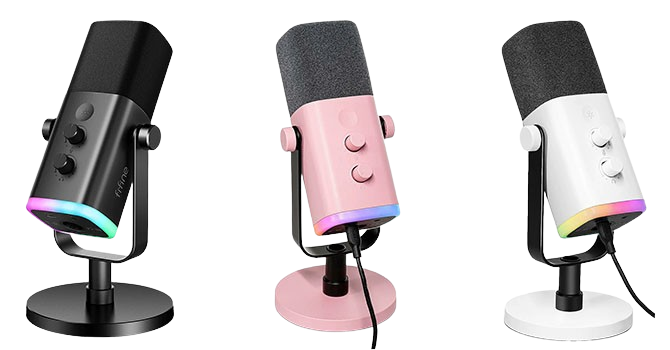
I’m not affiliated with Elgato, but their new Neo lineup includes a nice budget USB mic which looks quite stylish and produces some good sound, although my pick for starting from scratch with a budget would probably be the Fifine AM8 (about £50 and regularly on offer) with its flexibility of XLR or USB which should make any upgrade path slightly cheaper. After watching a ton of reviews, the Fifine has a nice sound to it, a capacitive mute button, headphone jack for direct monitoring, gain and volume knob for easy adjustments, and some RGB if you’re into that. You will need be careful of handling noise, but it should not be too bad once you have it where you want it.
There is an absolute plethora of headphones out there you can use with your chosen microphone, I will not go into suggestions as this will depend on their fit to your ears, if you like in-ear or over-ear headphones, your sensitivity to sound, your style, etc. I get on well with my bundled studio headphones from Focusrite, but your ears could get sweaty over a long session and they don’t have interchangeable ear cups, I also love my IEMs which were suggested by Nutty, although he seems to have an obsession and massive collection I know not everyone gets on with in-ear monitors so it really is dealers choice.
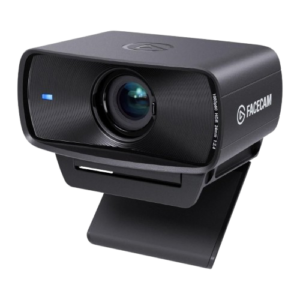
A camera is not required for streaming, but you will want one eventually so what do you do? Well… Nothing if you have an iPhone or one of the latest models of Android as you can use that as a USB webcam, it is probably better than the majority of webcams out there but you may need it to read your chat or for other purposes whilst streaming. Thankfully, I had a great community when I started streaming and I went from a terrible headset to the Scarlett 2i2, and no cam, to a terrible camera I had, to no cam again as it looked horrendous, to the original Elgato Facecam. Unless you have the budget for a mirrorless camera, and you intend to use it for photography or videography as well, I would say stick to the Elgato lineup for now. Some of their cameras are not cheap but go look at Harris Heller’s videos on them and tell me what you think. Again, Elgato now have the Neo lineup, so they are more affordable than they were when I first got into streaming (still around £100).
Get yourself nice lighting whatever camera you use, bad lighting will make even the best cameras look like absolute rubbish. You do not need to get studio or film grade lights, a couple of lamps with some good bulbs will do, and you can always point one at your face diffused with some baking paper if you want to look extra nice on a budget. They should be out of shot so it does not matter if it does not look the best.
The Key Light Mini’s I bought are around £60 each, can be battery powered at 50% for around 4 hours (you won’t want 100% pointing directly at your face but you might want to bounce them off a wall for a more even coverage), as well as being wired in with a bypass to preserve the batteries, making them a good dual use item as an emergence light, and the magnets on the back mean they can even be utilised as non-conventional work lights.
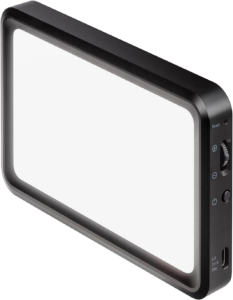
I’ll leave it up to you what keyboard, mouse, rainbow unicorn vomit, or computer you’d prefer, but I think if I were to start again I would go for the Fifine, one of the Elgato webcams, and a Key Light Mini if I was to start over again. If you have any suggestions for someone looking to build out a streaming career feel free to drop a few suggestions below, I won’t suggest computer components here as it varies so widely depending on your budget and use case, a hardcore AAA gamer will need far more power than a just chatting streamer, unless that streamer is also working on some high resolution video edits or animations, and what overlays and bots you have running during your stream can have a drastic impact on your performance. For now, I will just leave it at see you in the next post.